





















































































































Get rid of tan lines in the online photo editor



How to use the service “Remove tan lines”
The RetouchMe application is available on iOS and Android platforms. You can download it from the Apple App Store, Google Play or Amazon App Store.
- Launch or download the RetouchMe application.
- Select a photo from your gallery that you want to use the “Remove tan lines” service on.
- Choose the category “Body”.
- In this category, select the desired service “Remove tan lines”.
- Price of the “Remove tan lines” service: 10 ⭐.
- After selecting the services you want to use for the photo, click on the "Proceed" button.
- Review your order once again and click "Send to designer."
Pros and cons of "Remove tan lines" service in photo editor
 RetouchMe
|
Free Photo editor | Online Photo Editor | AI Photo Editor | |
|---|---|---|---|---|
| Difficulty of use |
Simple
RetouchMe allows you to press one or multiple buttons to achieve great results with the "Remove tan lines" service.
|
Medium
Free Photo editor requires good skills to achieve the expected results with the "Remove tan lines" service.
|
Medium
Online Photo Editor requires good skills to achieve the expected results with the "Remove tan lines" service.
|
Simple
AI Photo Editor allows you to press one or multiple buttons to achieve great results with the "Remove tan lines" service.
|
| Retouching quality |
Good
RetouchMe allows you to achieve good retouching results with the "Remove tan lines" service.
|
Bad
Free Photo editor does not allow you to achieve good retouching results with the "Remove tan lines" service.
|
Good
Online Photo Editor allows you to achieve good retouching results with the "Remove tan lines" service.
|
Bad
AI Photo Editor does not allow you to achieve good retouching results with the "Remove tan lines" service.
|
| Time to edit |
Fast
RetouchMe allows you to spend 3-5 minutes on editing for the "Remove tan lines" service.
|
Slow
Free Photo editor does not allow for quick editing of the "Remove tan lines" service.
|
Medium
Online Photo Editor allows you to spend 5-10 minutes on editing for the "Remove tan lines" service.
|
Fast
AI Photo Editor allows you to spend 3-5 minutes on editing for the "Remove tan lines" service.
|
| Naturalness |
Good
RetouchMe allows you to achieve a naturally acceptable result with the "Remove tan lines" service.
|
Unreliable
Free Photo editor gives an unpredictable result in terms of naturalness for the "Remove tan lines" service.
|
Good
Online Photo Editor allows you to achieve a naturally acceptable result with the "Remove tan lines" service.
|
Bad
AI Photo Editor does not allow you to achieve a naturally acceptable result with the "Remove tan lines" service.
|
- How to get rid of tan lines
- Two common ways to get rid of tan lines
- Remove tan lines with an app
- RetouchMe – the app to seamlessly edit your photos
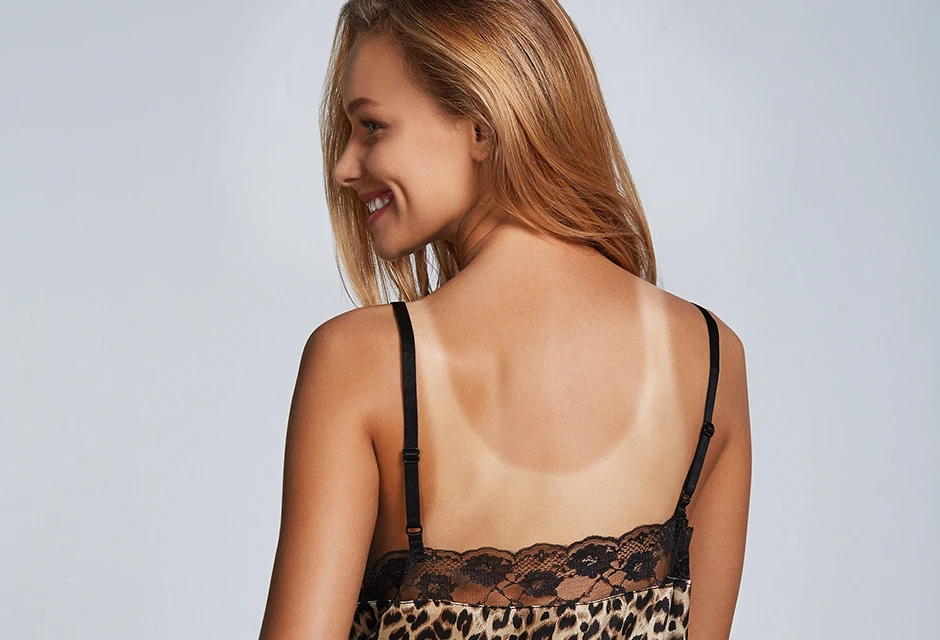
When beach season is in full swing, the last thing we would want to think about is how we would look in a photo. However, if we are not a nudist culture, being in the sun in a swimsuit for a long time leaves tan lines in the bikini area. This flaw can easily get caught in the frame and it is unlikely you will be happy to have a tan in the shape of your bathing suit, it looks ridiculous at least. But do not despair, if your photos are already taken and you notice tan lines out of nowhere, everything can be fixed. But how do you remove tan lines from pictures?

How to get rid of tan lines
There are multiple ways to make your photos look better and you do not have to get rid of your swimsuit at all. These methods will be similar in essence, but the methodology is different. As you may have already realized, we are talking about editing your photos or post-processing. Here it is important for us to understand what result we are aiming at, and the level of processing will mostly depend on the choice of software and our skill to use it. Let us go from the most obvious to the less obvious, taking into account the time spent.
Two common ways to get rid of tan lines
Let us start with the well-known Adobe Photoshop - perhaps the most powerful way to edit photos for every taste and color. Photoshop is endowed with a unique set of functions for every occasion or photo. In the case of tan lines, most of the time we just need to use the Patch tool. We are going to take samples nearby the tan lines and replace this area with a well-tanned area. Sounds like a very simple solution. But in reality, even if you are familiar with Photoshop’s interface and tools, using just a single tool will not guarantee you quality results. What happens the most is that using a patch tool may leave visible seams that you need to additionally work on using other tools to smooth everything out and you may end up doing a photo surgery trying to make everything look natural. Our skin glares on the sun, and different color areas will require you to do more precision editing. That sounds like a professional editor’s job, right? So let us take a look at other solutions which may be easier and not force you to learn complicated interfaces and tools.
Remove tan lines with an app

The application’s market is full of different solutions. There can be so many of these solutions that it becomes an additional problem - a problem of choice. Through trial and error, we will notice that there is no such application that is perfect for every photo. Every photo is unique, the light can fall on the area we want to edit or nearby, we can also use different cameras and the quality of the photos should be taken into account. In turn, most applications work on the principle of automatic algorithms which monitor on a program level the areas they consider appropriate and make edits on the same automated level. And if the photo quality is not top-notch, if the tan lines overlap with the clothes, or if there is too much color variety in the picture, the app might get confused and give you completely unacceptable results. Of course, if we want to simply remove tan lines from the feet, most of these apps may do a good job, however, the case could be more complex. For that specifically, we have created a unique application that will allow you to save time and edit your photographs in a couple of clicks and get the best quality results at the same time.
RetouchMe – the app to seamlessly edit your photos

We have developed the application taking into account everything we have listed above. The app is basically an interface that connects you with a team of professional photo editors on our end. This approach allows us to get the best results as we do all the jobs manually. Our team of professional designers will work on your photo pixel by pixel using Adobe Photoshop as they have a lot of experience in photo retouching. On your end, it only requires choosing the photo you want to edit, tell us the way you want it to be edited by choosing one of the options and then sending it through the app for processing. So, basically, you do a couple of clicks and get the best quality edit possible with no such thing as automatic presets of filter usage. The interface of our application is straightforward to get and intuitive, so people of any age category will be able to use it with no problems.
Our photo editing service is available to millions of users, elevating RetouchMe above the competition. The team of professional designers will always be ready to adjust any images according to your own personal preferences. 24/7 customer support service is ready to help you at any minute. With all the benefits you will receive while using the RetouchMe app, you can be sure that any photo edit you need to achieve, will be done with precision and dedication.





Co-founder of RetouchMe. In addition to business, he is passionate about travel photography and videography. His photos can be viewed on Instagram (over 1 million followers), and his films can be found on his YouTube channel.
Moreover, his profile is featured on the most popular and authoritative resource in the film industry — IMDb. He has received 51 international awards and 18 nominations at film festivals worldwide.